Indie dev studio · Austin, TX

Apps that keep working when the signal doesn't.

We build offline-first tools for people who work in the field: under bridges, on back roads, in basements and dead zones. The work happens on your device, and your data stays there.

This page is saved on your device after the first visit, so it also opens with no signal.

// What we promise

Three rules every app has to pass

"Offline-first" gets used loosely. Here is exactly what we mean by it.

01

It works with no signal

The core job of the app runs on your device. No connection, no login and no server are needed to do the work you opened it for.

02

Your data stays on your device

Your files, routes, photos and notes are stored on your phone. Nothing leaves it unless you choose to share it.

03

We say what needs a connection

Some things, like street-map backgrounds, do need the internet. Every app below lists them plainly, feature by feature.

// How we build

Offline-first is a build method

It can't be added at the end. These are the steps we follow on every project, ours or one we build with you.

  1. Put the logic on the deviceCalculations, file reading and AI run on the phone itself. No server sits between you and the work.
  2. Store data locallyEverything you save is written to the device first. The app guards against losing it if a read or write fails.
  3. Bundle what the app needsLibraries, maps code and models ship inside the app. Nothing essential is downloaded at the moment you need it.
  4. Share as files, not linksResults go out as PDF, CSV or app files through your phone's share sheet: email, Bluetooth, nearby sharing or a cable.
  5. Fail gently when the signal dropsIf a feature needs the internet, the app says so and keeps everything else working.
  6. Test in airplane mode before releaseNo app is called offline-ready until it passes a full run with every radio turned off.

Built by a nationally certified bridge inspector with more than 8,000 inspections in the field. These rules come from places where there is no signal to fall back on.

// Our apps

What we're building, and where each one stands

No "coming soon." Each app shows its real status and what works offline today.

● Works offline● Needs a connection

Route Optimizer

Passed airplane-mode test in emulator · beta

Load a spreadsheet of stops, get the best order to visit them, and go. It was first built around a server. We rebuilt it so everything runs on the phone, and the server is gone.

FeatureOfflineNotes
Import stops from CSV or Excel● YesRead on the phone. The file is never uploaded.
Optimize and reorder the route● YesDistances are straight-line estimates.
Save, share and import routes● YesAs PDF, CSV or a route file.
Map with stops and route line● YesDraws on a plain grid when there is no signal.
Street-map background● SignalMap images are downloaded as you view them.
Turn-by-turn navigation● SignalHands off to Google Maps.

Platform: Android. No account, no server. Try it in your browser →   Screens, full offline list and testing →
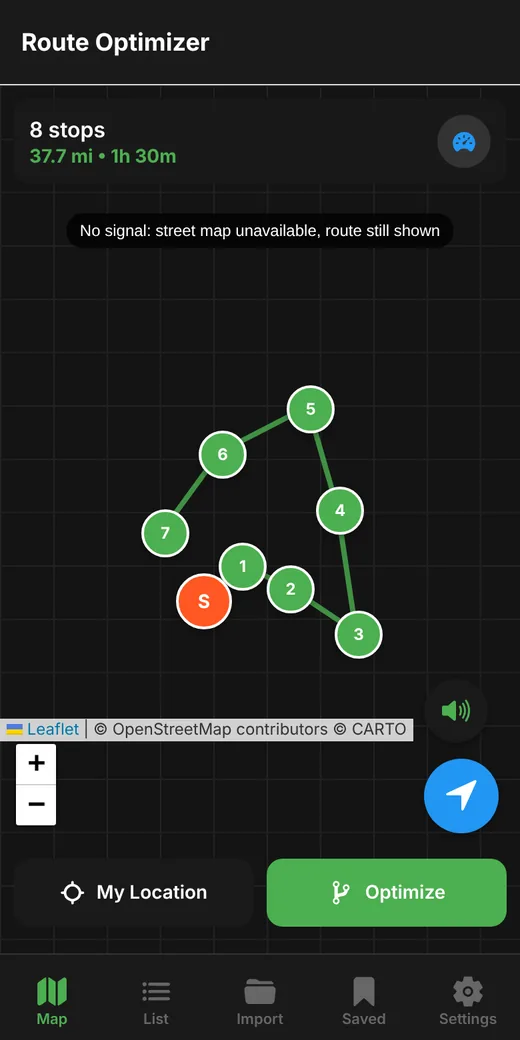
Route Optimizer map showing a numbered route drawn with no signal.

BridgeBuddy — AI Field Assistant

In development

An AI assistant for inspectors that runs on the device itself: voice notes turned into text, questions answered about a photo, and help spotting defects. The AI model lives on the tablet, so it is designed to work where there is no coverage at all.

Platform: Android. Not yet available. We will publish its offline feature list here when it reaches testing.

FieldStamp

First version built · not yet released

Field photo capture that installs from the browser like an app. It packages your photos into a bundle that hands off to BridgeBuddy for reporting.

Platform: installable web app. Not yet available. Its offline feature list will be published here after an airplane-mode test.

// Get in touch

Have a job that happens off the grid?

Questions, beta requests, or an offline-first app you need built. Tell us where the signal drops and what has to keep working.

✉ jbg@jbgbotology.com